Interactive Installation
Sensor-Driven Campaign Games
Brand activations where the shopper's own body is the controller. A depth camera reads their movement, a 30-second round delivers the product message, and the prize is in their hand before they walk away.
- Client
- 11-FTC for Colgate-Palmolive
- Platform
- Retail Kiosk (Unity 6)
See It in Action
The Catch Game running live on a pharmacy floor — the vertical screen, the depth camera mounted below it, and a shopper playing a round between the shelves.
Brand activations need to stop a passing shopper, teach a product message in under a minute, and hand out a prize — all running unattended on a single PC in a crowded store, with no controller to touch or clean between players.
How a Round Plays Out
Three screens take a passing shopper from curious to holding a prize.
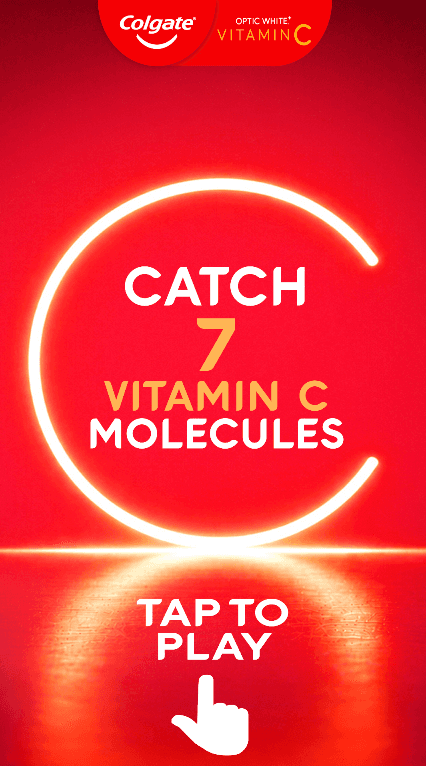 1Attract Screen
Step Up and Play
The screen loops an attract state inviting the shopper to tap and play. A 3-2-1 countdown follows, the depth camera picks up whoever is standing in front of the booth, and their body becomes the controller — no handset to pass between players.
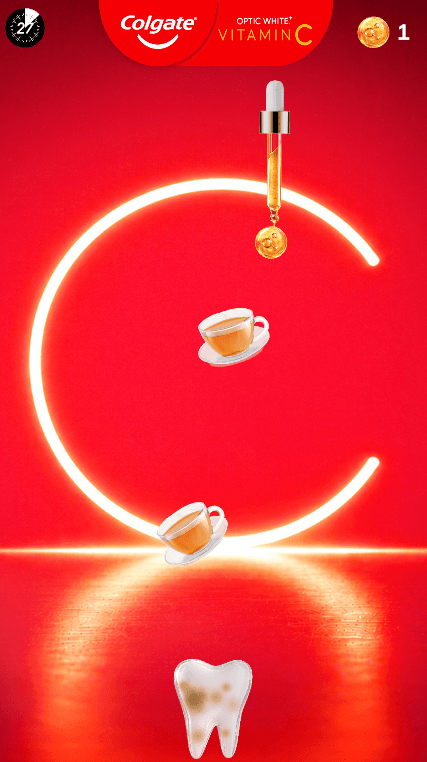 2Gameplay
Catch the Vitamin C
Moving left and right slides the catcher under the dropper. Vitamin C orbs clean the tooth a stage at a time; coffee and tea cups stain it back. The counter in the corner tracks orbs caught and the dial counts down the 30 seconds.
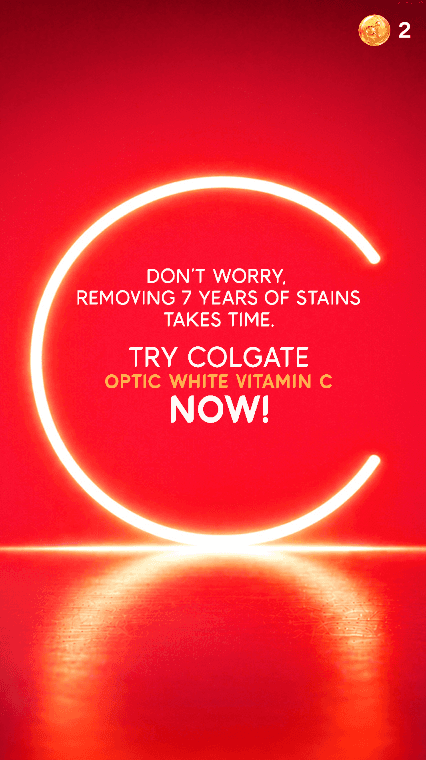 3End Screen
Claim the Prize
The round closes on a branded end screen — this one is the message for a player who ran out of time — and hands over the reward. The booth then resets itself for the next shopper in the queue.
The Rules of a Round
Short enough to play on the way past the shelf, long enough to land the product message.
- 7
- cleanliness stages
- 60/40
- spawn split
- 30s
- round timer
Stage 1 dirtiest through to Stage 7 cleanest
Vitamin C orbs versus staining enemies
Catch all 7 before it expires, or the round is lost
Three Ways to Hand Over a Prize
Every venue rewards players differently, so all three paths ship in the same build.
On-Screen QR
ZXing encodes the prize reference into a QR code the player scans straight off the screen.
Emailed Coupon
An SMTP layer sends the coupon or a screenshot of the round as a JPEG attachment.
Printed Receipt
A threaded print tool pushes a physical receipt through Windows and watches the print queue.
Under the Hood
The Player Is the Controller
Skeleton tracking from an Orbbec Femto Bolt maps the player’s horizontal position onto the catcher. The same input layer also supports Azure Kinect and Intel RealSense, so a booth can ship with whichever sensor the venue allows.
A Reusable Campaign Shell
Separate managers own the game loop, timer, score, and lives, so a new campaign changes the art, rules, and prize path without touching the tracking or reward layers underneath.
Prize Fulfilment Built In
QR, email, and print all ship in the same build. Which one a venue uses is a configuration choice, not a rebuild, because some clients hand out digital coupons and others need paper in hand.
Runs Without the Sensor
A keyboard debug mode disables tracking entirely, so the round can be tested, demoed, and QA’d on any laptop before the hardware reaches the venue.
Getting a Booth On-Site
Depth cameras are the fragile part of any installation, so the setup path is deliberately ordered.
- 1
Sensor First
The Femto Bolt is validated in Orbbec Viewer — colour, depth, IR, and IMU streams all live with rolling timestamps — before Unity is ever opened.
- 2
Wrapper Layer
The Orbbec K4A wrapper maps the camera into the Azure Kinect runtime, so the project keeps one body-tracking API across sensors.
- 3
No GPU Required
On booth PCs without an NVIDIA card, body tracking is switched to DirectML, which keeps the hardware bill to a Ryzen 7 and no discrete GPU.
- 4
Documented Handoff
The build ships with an operator setup guide and a developer technical guide covering the script reference, SDK inventory, and troubleshooting steps.
Solution
Built a reusable Unity 6 foundation where the player is the controller: a depth camera tracks the body and maps motion straight into gameplay. A set of managers handles the round loop, scoring, timer, and prize output, so each campaign reskins the art and rules while keeping the same tracking, reward, and setup layers. The flagship build is the Catch Game for Colgate Optic White Vitamin C.
Results
Deployed as an in-store retail activation, with prizes delivered on the spot by on-screen QR code, emailed coupon, or printed receipt, and handed over to the client with full operator and developer documentation.
Interested in working together?
I build interactive installations that turn sensors, screens, and a passing crowd into something worth stopping for.